
This article helps you plan a 4-week content calendar where every post points back to material you really have and are allowed to use: a clip you filmed, a question a client asked, work you did. AI handles the arranging, counting hours and drafting the framework; you keep control of the facts and the usage rights. The end result is a sample week you can run right away and a framework for the next three weeks.
This is a planning method, not a formula for more views. There is no evidence that this calendar increases reach (number of people reached) or revenue. It helps you avoid running out of time mid-week and avoid asking AI to invent stories to fill gaps.
A few terms used here
- Prompt (text you type for AI): the text you paste into ChatGPT, Claude or Gemini.
- Content calendar: a table of posting dates, what each post is, who makes it and who approves it.
- Content pillar: 3 to 4 recurring topic groups, for example "work process", "answering questions".
- Angle: what a post chooses to say, for example "why I clean my brushes after every client" rather than "cleaning brushes".
- Material library: the list of photos, clips, questions and notes you already have. Each item has a code (T01, T02...) so the calendar can point to it.
- CTA (call to action): the closing line inviting viewers to do something, for example "message me to book a trial makeup".
- Shot list: the shots needed for one video. Call time: the time you must be on site.
Prepare your sources and remove private details
Before you paste anything into AI:
- Client questions: copy the content, remove names, phone numbers and account names.
- Photos and clips with clients: do not upload them to AI. Just describe them in words ("hands-only clip, face not visible") and note the usage rights: what the client agreed to, how they agreed, and whether they need to see the final version.
- For material you have not asked the client about, write "not asked".
- Measure real hours: time yourself from setting up lights to exporting the file.
Step 1. Check your material library
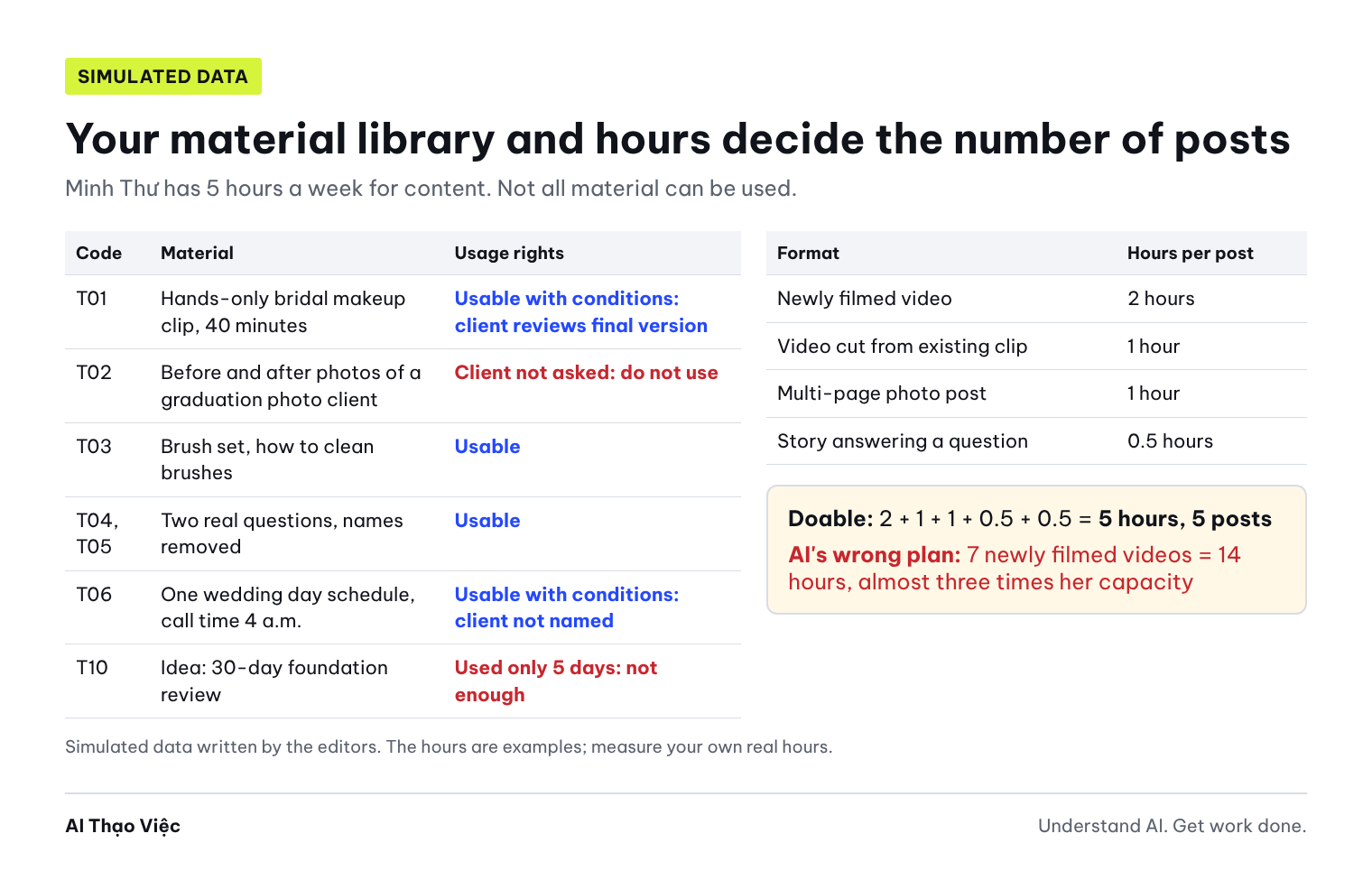
The running example: Minh Thư (a simulated character), a freelance makeup artist doing bridal and graduation photo makeup, who runs her own TikTok channel and Facebook page. Paste the block below into AI, or replace it with your own library using the same structure.
PROFILE (SIMULATED)
Creator: Minh Thư, freelance makeup artist, takes bridal and graduation photo clients.
Channel goal for the next 4 weeks: people about to marry understand how Minh Thư works and message to ask about a trial session.
Main audience: women aged 22 to 30 who are about to marry or about to take graduation photos.
Hours for content: week 1: 5 hours; week 2: 5 hours; week 3: 3 hours (3 weddings); week 4: 5 hours.
Fixed schedule: Tuesday off; Saturday and Sunday usually fully booked with clients.
Hours per format (self-measured): newly filmed video 2 hours; video cut from an existing clip 1 hour;
multi-page photo post 1 hour; story answering a question 0.5 hours.

MATERIAL LIBRARY
T01: hands-only clip of bridal makeup, 40 minutes, face not visible. Client agreed by message, wants to see the final version before posting.
T02: before and after photos of a graduation photo client. Client not asked.
T03: brush set and how brushes are cleaned after each client. Minh Thư's own tools, she can film this herself.
T04: real question, name removed: "For an outdoor party, how long will the makeup last?"
T05: real question, name removed: "What should I prepare before the makeup session?"
T06: schedule of one wedding day, call time 4 a.m. May be shared if the client is not named.
T07: notes from a one-on-one makeup lesson. The learner has not agreed to filming or being named.
T08: concept photos shot with photographer Quang Huy. May be used with credit.
T09: service price list published on her page.
T10: idea "review of Brand A foundation after 30 days". Used for only 5 days, no diary kept.
The data set deliberately has three spots to test the AI: T02 has no consent, T07 can only be used for its knowledge, T10 does not have enough experience for a review.
Help me check my material library before planning a content calendar.
Use only the profile and material library I paste. Do not add any clients, praise,
service results or channel stats that are not in the library.

Make a table: Code | Material | Usable / Usable with conditions / Do not use yet | Condition or reason | What to do before using.
Rules:
- Material involving another person without their consent: Do not use yet.
- Material that another person must review in final form: Usable with conditions, state who reviews.
- Ideas without enough time of real experience: Do not use yet, state what is missing.
At the end of the table, list the questions I need to send to each person involved.
Editorial answer: Usable: T03, T04, T05, T09. Usable with conditions: T01 (client reviews the final version), T06 (client not named), T07 (knowledge only, no images, learner not named), T08 (credit Quang Huy). Do not use yet: T02 (client not asked), T10 (only 5 days, no diary). Questions to send: ask the graduation photo client about the T02 photos; ask the learner if you later want to film the lesson.
Step 2. Choose content pillars and turn hours into posts
Content pillars grow from your library, not from a trend list. Minh Thư's library supports three pillars: work process (T01, T03, T06), answering real questions (T04, T05), client preparation (T05, T09).
From the sorted library table, suggest 3 content pillars.
For each pillar, list the material codes that support it. Do not suggest a pillar with no codes.

Then, for each week, calculate how many posts I can make with the hours I have
and the hours per format in the profile. Show the addition of hours.
Total hours each week must not exceed the hours I have.
If an arrangement needs new material to be filmed, mark it "needs filming"; do not treat it as existing.
Editorial answer for week 1 (5 hours): 1 newly filmed video (2 hours) + 1 video cut from an existing clip (1 hour) + 1 photo post (1 hour) + 2 stories (0.5 + 0.5 hours) = 5 hours, 5 posts. Week 3 has only 3 hours: 1 cut video (1 hour) + 1 photo post (1 hour) + 2 stories (1 hour) = 3 hours, 4 posts, no newly filmed video.
Step 3. Plan week 1, each post tied to a material code
Plan week 1 using the number of posts calculated.
Table: Day | Pillar | Post and angle | Material code | Format | CTA | Hours | Reviewer | Status.
Rules:
- Every post must have at least one material code that is "Usable" or "Usable with conditions".
- Posts using conditional material: write the condition in the Reviewer column.
- Do not schedule posts on Tuesday or Sunday.
- Status can only be: Planned / Needs filming / Filmed / Posted. All newly planned posts are "Planned".
- Do not write client praise, do not promise results such as "lasts 12 hours" or "brighter skin".
At the end of the table, list the rejected ideas and why.
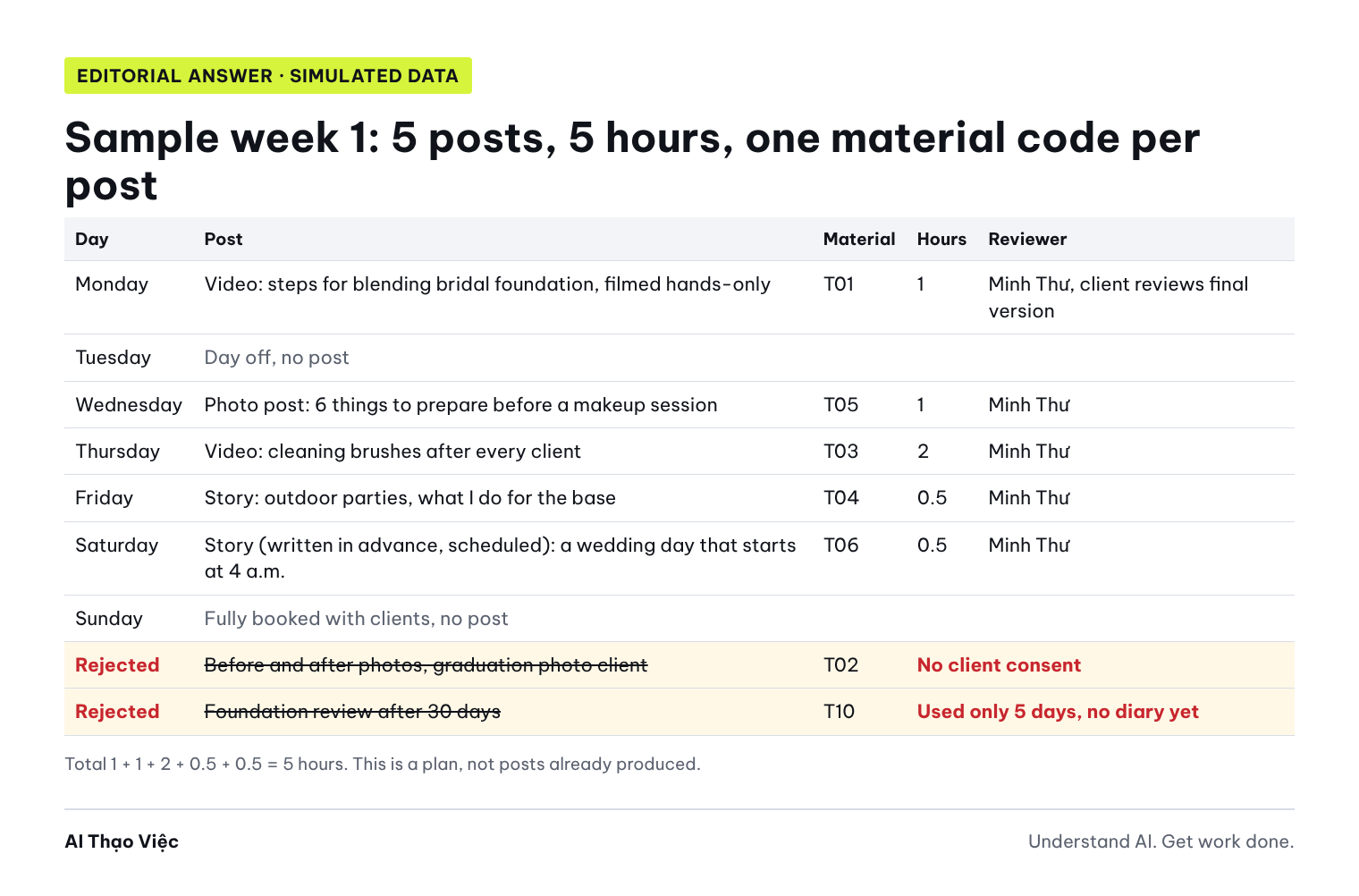
Expected output, Editorial answer (written by the editors, not yet run on a real AI tool):
| Day | Post and angle | Code | Format, hours | CTA | Reviewer |
|---|---|---|---|---|---|
| Monday | Steps for blending bridal foundation, seen from the artist's hands | T01 | Cut video, 1 hour | Message to ask about a trial session | Minh Thư; T01 client reviews the final version |
| Wednesday | 6 things to prepare before a makeup session | T05 | Photo post, 1 hour | Save this post before your wedding day | Minh Thư |
| Thursday | Why I clean my brushes after every client | T03 | Newly filmed video, 2 hours | Ask more about my tools | Minh Thư |
| Friday | Outdoor parties: what I do for the base, and what I cannot promise | T04 | Story, 0.5 hours | Send your next question | Minh Thư |
| Saturday | A wedding day that starts at 4 a.m. | T06 | Story, 0.5 hours; written in advance and scheduled because Saturday is fully booked | None needed | Minh Thư; client not named |
Rejected ideas: T02 before and after photos (no consent); T10 foundation review (only 5 days, no diary). Total 5 hours, matching her capacity. Status of all 5 posts: Planned.
Step 4. Spot bad output
Three common errors when asking AI to plan a beauty calendar, compared with the answer above:
- Invented experiences and results: the AI writes the caption "Clients say their skin was visibly brighter after 1 session, and the base lasted a full 12 hours". The library has no praise and no hour figures. These are testimonials and service results the AI made up.
- Not counting hours: the AI schedules 7 newly filmed videos for week 1, one a day. 7 × 2 = 14 hours, while Minh Thư has 5 hours. This calendar breaks down by Wednesday.
- Mixing plans with finished posts: the AI marks the brush cleaning video "Ready to post" while it has not been filmed. Or it uses T02 because "the photos are already there".
How to check: add up the hours for each week; trace the material code in every row; search for the words "clients say", "lasts", "brighter", "guaranteed".
The calendar you just made has errors; fix it:
1. Delete all praise, service results and makeup-lasting hours that are not in the material library.
Replace them with what I do, based only on material with a code.
2. Add up the hours for each week again. If a week goes over the hours I have, cut posts or switch to a format that takes fewer hours.
Show the addition after fixing.
3. Every post not yet filmed has status "Planned" or "Needs filming", never "Ready".
4. Remove posts using T02 and T10, and state why.
List every row you changed before giving the new table.
Step 5. Expand to 4 weeks and pick a test week
Expand only once week 1 is right. The current library covers only about one to two weeks, so new material must be listed as filming tasks with a shot list, not treated as existing.
Use the fixed week 1 calendar and expand it to 4 weeks.
Summary table: Week | Hours available | Number of posts | Addition of hours | Pillars | Existing material codes | Material to film.
Rules:
- Week 3 has only 3 hours, do not schedule newly filmed videos.
- One existing clip can be cut several times, but each time T01 is used the client must review the final version.
- Material to film gets new codes starting from T11, with a shot list of 3 to 5 shots and status "Needs filming".
- Do not schedule any post based on T02, T07 with images, or T10.
Finally, point out which week is most at risk if an extra wedding comes up, and which post to drop first.
Editorial answer (4-week framework):
| Week | Hours available | Posts | Addition | Main material | To film |
|---|---|---|---|---|---|
| 1 | 5 | 5 | 2 + 1 + 1 + 0.5 + 0.5 | T01, T03, T04, T05, T06 | T11 (newly filmed from T03 material) |
| 2 | 5 | 5 | 2 + 1 + 1 + 0.5 + 0.5 | T01 (different segment), T08, T09 | T12: preparing tools before an early-morning booking |
| 3 | 3 | 4 | 1 + 1 + 0.5 + 0.5 | T01, T07 (knowledge only, text format), T05 | None |
| 4 | 5 | 5 | 2 + 1 + 1 + 0.5 + 0.5 | T06, T09, new questions received during the month | T13: trial makeup, hands-only, once a client agrees |
Total 19 posts in 18 hours. Week 3 is most at risk: if another booking comes up, drop the photo post first and keep the 2 stories. Video T13 is filmed only when a client agrees; until then, replace it with a story answering a question.
Choose week 1 as the test week. At the end of the week, compare real hours with planned hours; if they differ a lot, recalculate all 4 weeks.
The 4-week calendar is an internal plan. According to TikTok for Business, videos can be scheduled on the web upload page from 15 minutes to 10 days before posting, and scheduling on desktop needs a business account: so you schedule in batches of about one week. YouTube Studio lets you set a time for a private video to become public; the date on the watch page uses PST (Pacific time), which may differ from Vietnam time. Features may change, so check again in the app.
To write captions in your own voice, use Ask AI to write in your own voice (in Vietnamese). To find bigger stories in the same material library, see Finding a brand story in real material (in Vietnamese). Those two articles are supporting steps; this article covers a calendar you can actually deliver.
Use it with your own data
- List your real material library, one code per item, with usage rights in words. For anything you have not asked about, write "not asked".
- Measure real hours for each format you often make, at least once per type.
- Write the hours available for content each week, minus the client bookings you have accepted. Wedding season and graduation season will leave fewer hours.
- Run prompts 1, 2 and 3 in order. Add up the hours yourself and trace the material code in every row.
- Posts involving clients, learners or collaborators: send them the final version before posting, and keep the message where they agree.
- Shop owners with staff making content: note who films, who edits and who gives final approval.
- Test week 1, record the real hours, and only then run prompt 5.
Tip for workshops or classes: during the session, each person plans one week from their own library or the simulated set, then swaps with the person next to them to trace codes and add up hours; after class, they expand it to 4 weeks and test it.
Check before you use it
- Every post in the calendar has at least one material code found in the library.
- No "not asked" or "do not use yet" material has slipped into the calendar.
- Hours for each week do not exceed the hours you have.
- Busy weeks (wedding season, many bookings) have fewer posts, not the same number.
- No praise, testimonials, service results or channel stats added by the AI.
- Each post's status matches reality: Planned, Needs filming, Filmed or Posted.
- Posts involving other people note who reviews the final version.
- There is a test week and a place to record real hours for comparison.
Troubleshooting
- The AI keeps adding client praise: paste the library again and remind it "use only material with a code"; delete anything left over yourself.
- The library is too small for 4 weeks: plan 2 weeks; the rest is a "needs filming" list with shot lists.
- Real hours are double the planned hours: fix the hours-per-format table and run prompt 2 again; you will usually need to switch some newly filmed videos to stories.
- A client changes their mind and no longer wants the post: remove the post from the calendar, change the material status to "do not use yet"; do not blur it and post anyway.
- An urgent client booking comes up mid-week: drop posts in the order noted in prompt 5; do not push them into the next week.
Limits and sources
The character, material library, working hours and answers were written by Tổ Thạo Việc (the AI Thạo Việc editorial team) with simulated data; the prompts have not been run on a real AI tool and can be used with text AI assistants such as ChatGPT, Claude and Gemini. This article does not measure effects on views or revenue.
- TikTok for Business, Video Scheduler: schedule videos in advance, read on 31 Oct 2026.
- YouTube Help, Schedule video publish time, read on 31 Oct 2026.
Read next: A 30-second clip draft with CapCut (in Vietnamese) to edit videos faster, and Ask AI to challenge your plan (in Vietnamese) before you lock in the calendar.