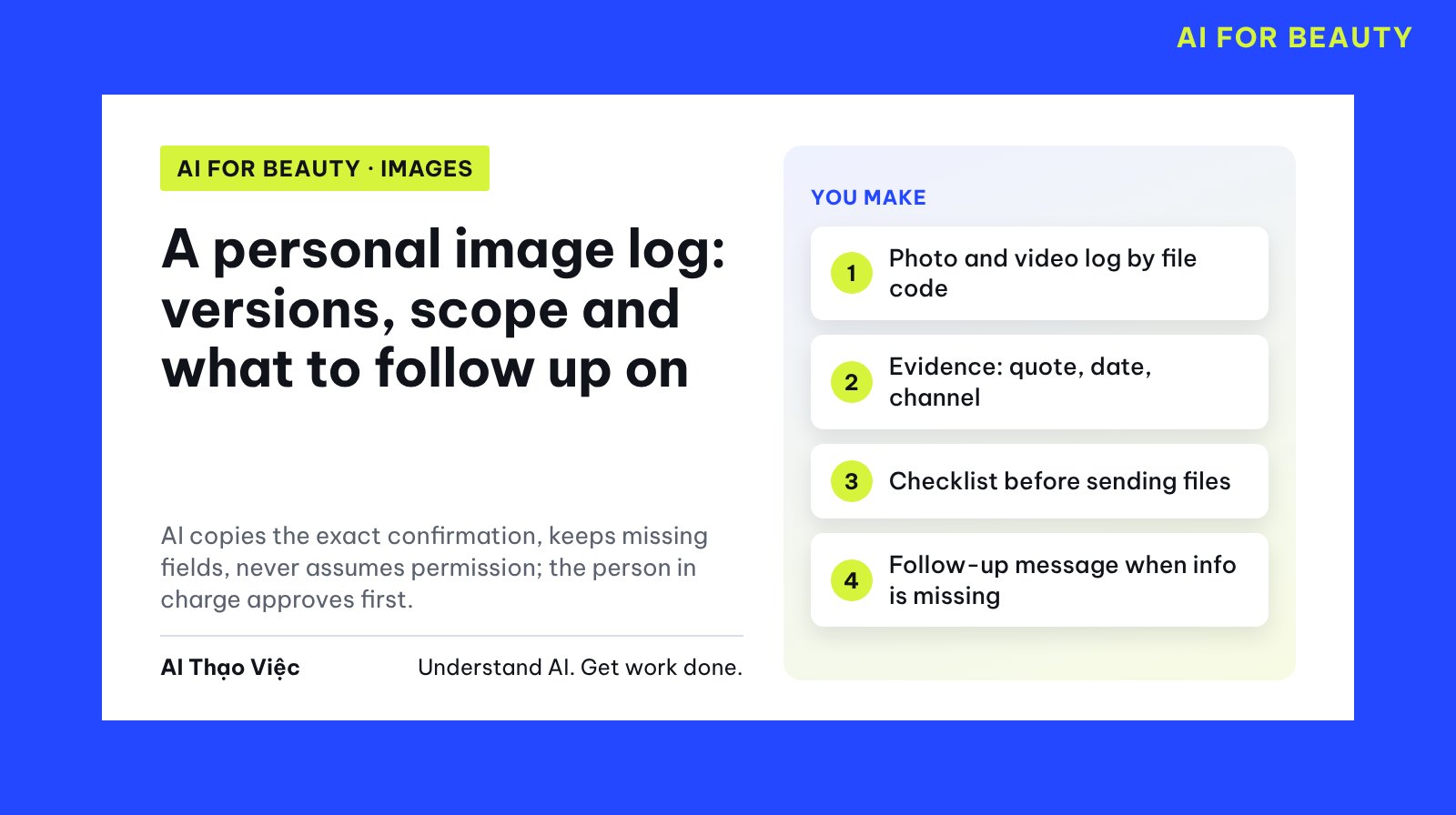
When your photos and videos pass through several partners, the hardest question is usually not "which photo looks best" but "which version was approved for whom, used where, and until when". This article shows how to ask AI to build a tracking log: assign file codes, copy the exact confirmation with its date and channel, keep empty fields as they are, and check before every file you send. This is a method for recording and cross-checking, not a way to decide who has which rights.
Background article to read first: Reviewing your personal footprint online (in Vietnamese). That article finds where your photos currently appear; this one keeps a log of files you actively send out. This article does not explain how to sign or interpret contracts.
A few terms used here
- Image log: a spreadsheet where each row is one file, one partner, one scope of use.
- File code: a fixed name for one photo or video, for example LC-2609-01 (person, year and month, sequence number).
- Version (shortened to v1, v2): the edits of the same photo. The approved version is the version you agreed can be used.
- Scope: which partner, on which channel, from which date to which date.
- Evidence: the confirmation quoted word for word, with the date and the channel it came through (email, Zalo, Messenger).
- Person in charge: the person who gives final approval before a file is sent, usually you or your manager.
- Prompt: the "Prompt" blocks can be copied; the "Simulated data" blocks are samples to paste along with them.
Prepare your source and remove private details
The AI does not need to see the photos to build the log. Paste only the file names and the message text. Do not upload real photos of yourself or anyone else to the AI unless you have permission. Before pasting, replace phone numbers, emails and contact names with roles ("Hoa Mộc's contact person"); remove prices, account numbers and contract terms. Give each message a code: E for email, Z for Zalo, M for Messenger.
This works with text AI assistants such as ChatGPT, Claude or Gemini; then copy the result into Google Sheets or Excel. The real log should live in your spreadsheet, not in a chat history.
Step 1. Assign file codes and versions
Naming convention: person code, year and month, sequence number, version. For example, LC-2609-01_v2.jpg is Lan Chi's photo number 01 from September 2026, second edit. Rename the original file once, and then every email and message refers to this code.
FILE LIST (SIMULATED)
Model: Lan Chi. Assistant: Bảo Ngọc.
LC-2609-01_v1.jpg  studio portrait, first version, color still off
LC-2609-01_v2.jpg  studio portrait, color-corrected version
LC-2609-02_v1.mp4  15-second behind-the-scenes video
LC-2610-03_v3.jpg  photo holding a product, shot by Studio Ánh Dương
LC-2610-04_v1.jpg  hair lookbook photo
LC-2610-05_v2.mp4  60-second interview video
lookbook-moi.jpg   not clear which file this is
From the file list below, build a table: File code | Version | Type | Description.
Code rule: name initials, year and month, sequence number, suffix _v and the version number.
For any file that does not follow the rule, write "no code yet" and ask me; do not
assign a code yourself. Do not merge versions of the same photo into one row.
Editorial answer: 6 files have codes, and LC-2609-01 has two rows, v1 and v2. The file "lookbook-moi.jpg" must be marked "no code yet" with the question: is this LC-2610-04_v1 or a different photo? If the AI assigns it to LC-2610-04 on its own, that is wrong.
Step 2. Quote the confirmation exactly
The simulated messages below deliberately include: a later message that asks for more than an earlier email, two agreements with no time limit, one file sent with no reply, and a new request mentioning "the original".
MESSAGES (SIMULATED, PRIVATE DETAILS HIDDEN)
E1. Email, 28 Sep 2026. Hoa Mộc's contact person: "We would like to use photo
LC-2609-01 version v2 on the Hoa Mộc fanpage for 3 months, from 1 Oct 2026."
Lan Chi replied the same day: "I agree."
M1. Messenger, 2 Oct 2026. Brand A: "Let us post the behind-the-scenes clip
LC-2609-02 on Brand A's TikTok, okay?" Lan Chi: "ok."
Z1. Zalo, 5 Oct 2026. Hoa Mộc's contact person: "We will also run ads
with this photo, okay?" No reply yet.
E2. Email, 9 Oct 2026. Lan Chi to Studio Ánh Dương: "I agree to let the
studio use photo LC-2610-03 version v3 as a portfolio piece on the studio website from
10 Oct 2026."
E4. Email, 12 Oct 2026. Bảo Ngọc sent Mây Hair Salon the file LC-2610-04_v1 "for
the salon to preview". The salon has not replied.
E3. Email, 18 Oct 2026. The Tóc Xanh program: "We would like to use video LC-2610-05
version v2 on the program's Facebook and YouTube from 20 Oct 2026 to
20 Oct 2027." Lan Chi replied the same day: "Agreed."
E5. Email, 29 Oct 2026. Hoa Mộc's contact person: "Please also send the original
of LC-2609-01 so we can print a standee for the store."
For each message code (E, M, Z), build a table: Code | Date | Channel | Who said it |
Verbatim quote | File and version mentioned | Usage channel mentioned |
Time period mentioned | Is there a reply from Lan Chi agreeing.
Copy only what is in the text. For any field the text does not mention, write "Missing".
Do not treat a partner having received a file, or not replying, as agreement.
Do not conclude who has which rights.
Step 3. Build the log and keep missing fields
From the two tables above, build an image log where each row is one file, one partner,
one channel. Columns: File code | Approved version | Partner | Channel | Start date |
End date | Evidence (code, date, message channel) | Open questions |
Status (Complete, Missing, Conflict, Not confirmed).
Rules:
1. Any field not in the evidence: write "Missing", do not guess.
2. If you calculate a date from a period like "3 months", write both the original words and
"(calculated, needs confirmation)".
3. If two messages say different things about the same file: create a separate row, cite both
codes, status "Conflict". Do not pick a side.
4. No agreement sentence: status "Not confirmed".
5. A new request with no reply yet (like E5) does not become a scope row;
put it in that file's open questions.
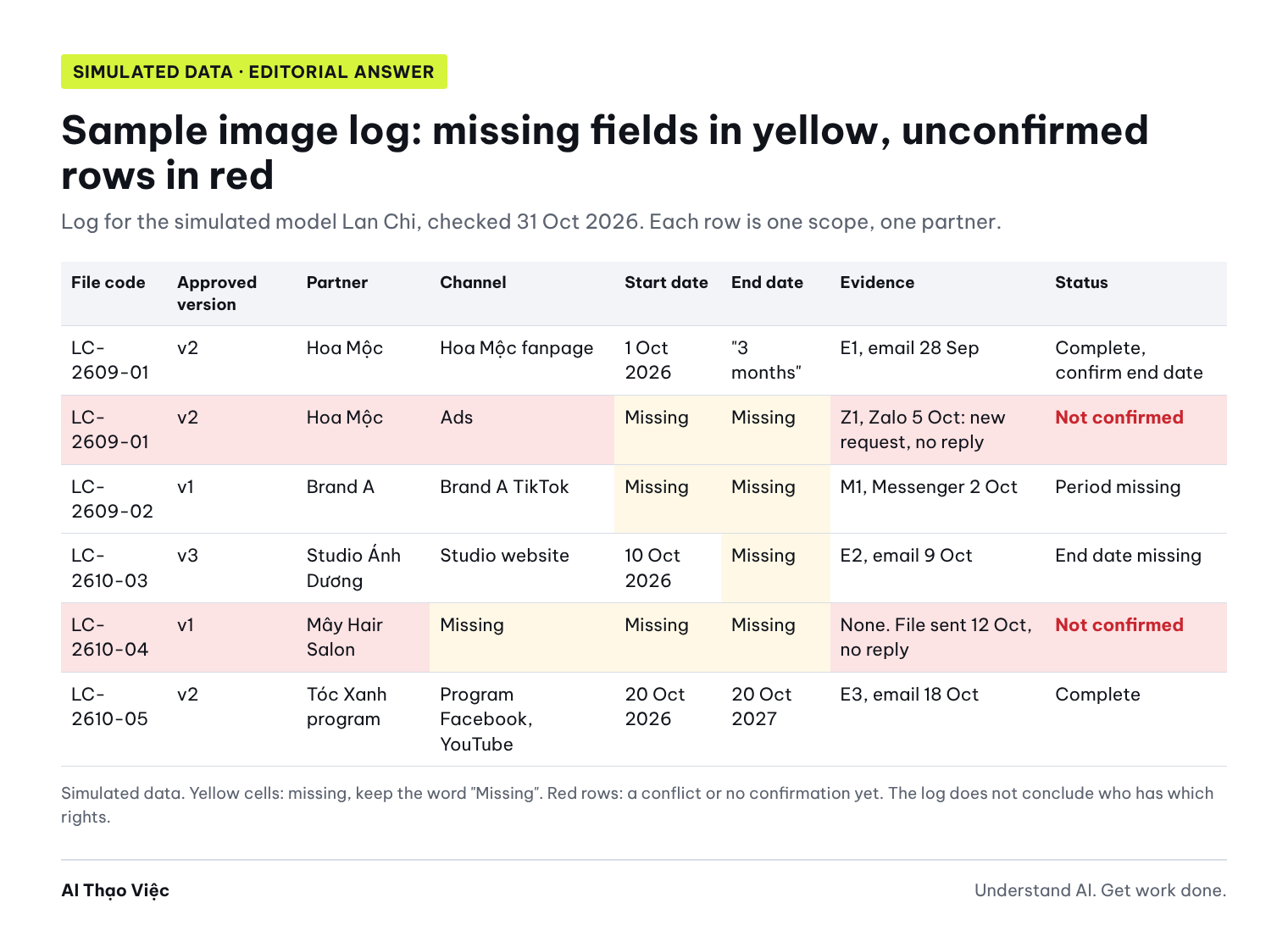
Editorial answer (written by the editors, not run on a real tool), open questions column:
| Row | Status | Open questions |
|---|---|---|
| LC-2609-01 v2, Hoa Mộc, fanpage | Complete | "3 months from 1 Oct 2026": is the last day 31 Dec 2026 or 1 Jan 2027? (calculated, needs confirmation). E5 asks for "the original" to print a standee: no reply yet. |
| LC-2609-01 v2, Hoa Mộc, ads | Not confirmed | Z1 is a new request, Lan Chi has not replied; E1 only mentions the fanpage. Ads on which platform, from which date to which date? |
| LC-2609-02 v1, Brand A, TikTok | Missing | M1 does not mention a time period. Posted from which date, until when? |
| LC-2610-03 v3, Studio Ánh Dương, website | Missing | E2 has no end date. The studio shot the photo: is there a separate agreement between the two sides? |
| LC-2610-04 v1, Mây Hair Salon | Not confirmed | E4 only sent the file "to preview". Does the salon plan to use the photo, and on which channel? |
| LC-2610-05 v2, Tóc Xanh, Facebook and YouTube | Complete | None. |
Why the log does not say "agreed" when there is only silence. Civil Code 2015 (Bộ luật Dân sự), Article 32 on a person's rights to their image, states: "The use of an individual's image must be consented to by that person" (unofficial translation), and using another person's image for commercial purposes requires paying the person in the image, unless the parties agree otherwise. The Personal Data Protection Law 91/2025/QH15 (Luật Bảo vệ dữ liệu cá nhân, in effect from 1 Jan 2026) states this principle for consent to personal data processing: "Silence or non-response shall not be considered consent" (unofficial translation); this article cites it to explain how to keep the log, not to apply it to your specific case. Article 32 of the Civil Code is cited for the same purpose only. This is not legal advice; ask a qualified professional before signing or publishing. Photos taken by a photographer or studio may also involve the photographer's rights; record this as a separate question in the log and ask a qualified professional.
Spot wrong output
Three common errors when the AI "fills in the table to make it complete":
- Inferring agreement from a file being received: the Mây Hair Salon row says "Agreed, file sent 12 Oct". E4 was only sent for preview, with no confirmation.
- Choosing the broader version on its own: the Hoa Mộc row says "fanpage and ads, until 31 Dec 2026" based on Z1, dropping E1. It should be two rows: the fanpage row cites E1; the ads row cites Z1, status "Not confirmed" because Z1 is a new request nobody has answered.
- Filling missing fields: the Brand A row says "no time limit" because M1 does not mention one. If it is not mentioned, write "Missing".
How to check: for every field with text, trace it back to the evidence code and find those exact words in the message. If you cannot find them, the field is wrong.
The log you just built has fields that are not in the evidence. Fix them by these rules:
1. Mây Hair Salon: E4 was only a file sent for preview. Status "Not
confirmed", scope fields say "Missing".
2. Hoa Mộc: split into two rows. The fanpage row cites E1. The ads row cites
Z1, put Z1 in open questions ("new request, Lan Chi has not replied"),
status "Not confirmed".
3. Brand A: the time period field says "Missing", not "no time limit".
After fixing, list every field you changed and its evidence code.
Step 4. Check the file you plan to send
Before every file you send, go through the five questions in the order shown in the diagram. One "missing" means stop.
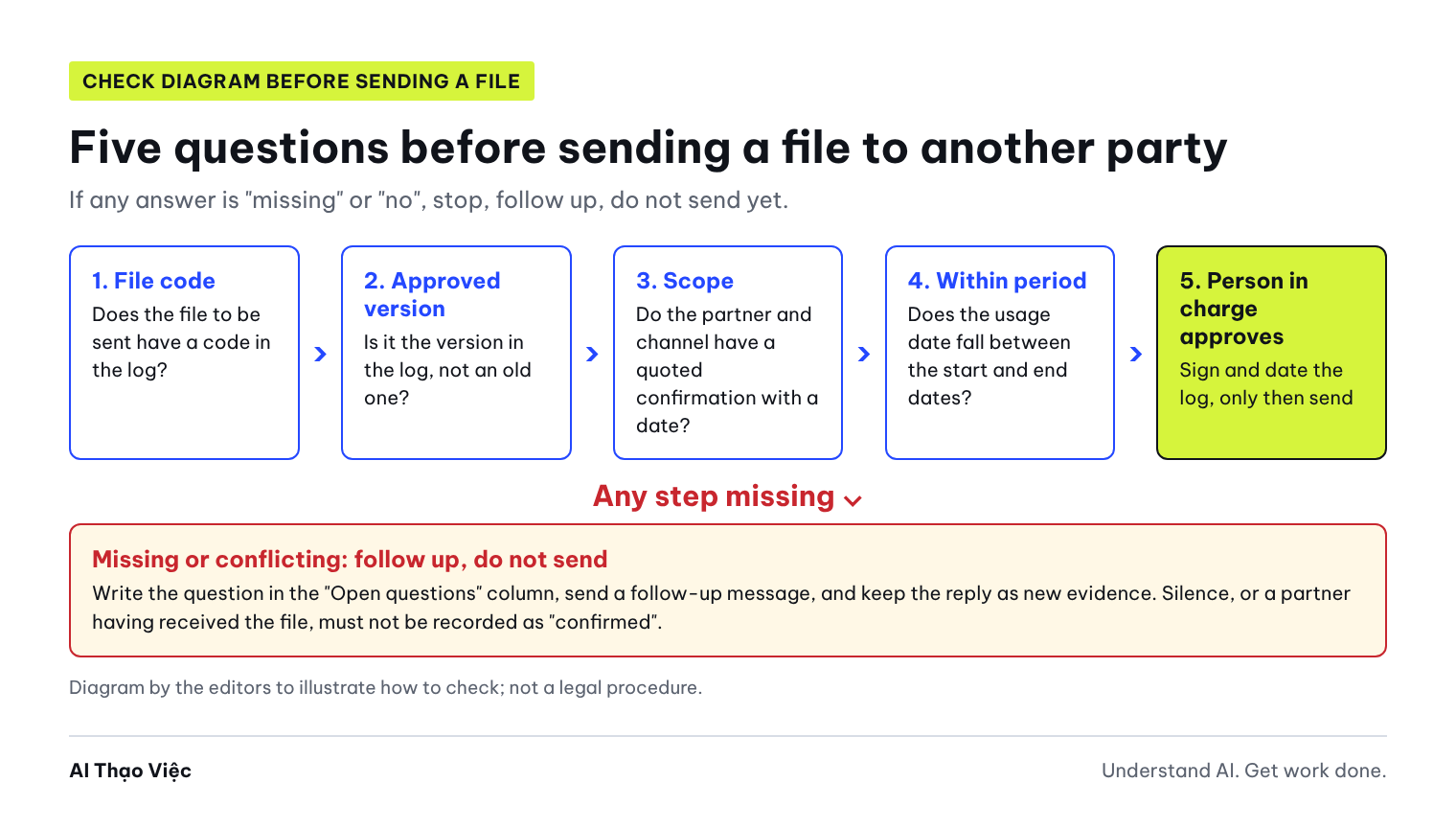
Check date: 31 Oct 2026. Hoa Mộc sent E5 asking for "the original of LC-2609-01 to print
a standee for the store". Check it against the log using these 5 questions:
1. Does the file to be sent have a code in the log?
2. Is it the approved version? Which version is "the original"?
3. Is there evidence for the channel "print a standee for the store"?
4. Does the usage date fall between the start date and end date?
5. Has the person in charge approved it?
Answer Yes, No or Missing for each question, with the evidence code.
The conclusion can only be "Can be passed to the person in charge for approval" or
"Do not send yet, follow-up needed", with a list of questions.
Editorial answer: question 1 Yes (LC-2609-01). Question 2 Missing: the approved version is v2, while "the original" could be the unedited file or v1, which is unclear. Question 3 No: E1 only mentions the fanpage, not printing. Question 4 Missing: it is not known how long the standee will be used. Question 5 Not yet. Conclusion: Do not send yet, follow up on which version, how many locations it will be printed for, and until what date it will be used.
Step 5. The person in charge approves, follows up and keeps evidence
The AI drafts the follow-up message; the person in charge reads it, edits it and sends it personally. A follow-up message should be neutral: state what has been agreed, what is unclear, and ask closed questions that can be answered quickly.
Draft a short, polite email to Hoa Mộc's contact person, from the assistant
Bảo Ngọc on behalf of Lan Chi. Content:
1. Restate the scope agreed in E1, quoted word for word.
2. Name the two open items: ads (Z1) and printing a standee (E5).
3. For each item, ask: which version, channel or place of use, start date, end date.
4. Say clearly that we will send the file after Lan Chi confirms by email.
Do not mention legal terms, do not include prices, do not use a blaming tone.
Editorial answer (sample message):
Subject: Confirming the scope of use for photo LC-2609-01

Hello,
I am Bảo Ngọc, Lan Chi's assistant. In the email of 28 Sep 2026,
both sides agreed to: "use photo LC-2609-01 version v2 on the Hoa Mộc fanpage
for 3 months, from 1 Oct 2026".
There are two items I still need to confirm:
1. Ads (Zalo message of 5 Oct): which platform will the ads run on,
from which date to which date, and is it version v2?
2. Standee printing (email of 29 Oct): which version do you need, how many
stores will it be printed for, and until what date will it be used?
Once Lan Chi confirms by email, I will send the correct version of the file.
Thank you.
When you get a reply, keep the evidence: export the email as a PDF or take a screenshot of the message showing the date and time, name it with the file code and message code (for example LC-2609-01_E6.pdf), and store it in that file's folder. Add a new row to the log without deleting the old one; change the old row's status and write "replaced by E6". The last column of the log records the approver and the approval date.
Exercises
- Using the two simulated data sets, run prompts 1 to 5 and compare with the editorial answers. Count how many fields the AI filled in without evidence.
- Add one simulated message: "Z2. Zalo, 1 Nov 2026. Lan Chi: I agree to run Facebook ads with version v2 until 31 Dec 2026." Run prompt 3 again. The output passes when the ads row cites both Z1 and Z2, and the scope is limited to Facebook.
Do not upload real photos to the AI during the exercises. Idea for a workshop or class: work in pairs, one person plays a partner writing vague messages, the other builds the log and drafts the follow-up message.
Use it with your own material
- List every file sent in the last 3 months. Rename them using the code convention; keep a table mapping old names to new codes.
- Find the emails and messages that mention each file. Hide private details and assign codes E, Z, M.
- Run prompts 2 and 3 and copy the log into a spreadsheet. Highlight "Missing" fields in yellow, and "Conflict" and "Not confirmed" rows in red.
- Send a follow-up message for each incomplete row. Until there is a reply, do not send more files.
- The person in charge reviews the log every week and before every file is sent. If there is a contract, a qualified professional reads the contract; the log only records the scope that was discussed.
Check before you use it
- Every file has a code and version; no "no code yet" file is about to be sent.
- Every scope row has evidence: quote, date, message channel.
- Fields not in the evidence say "Missing" and have not been filled in.
- Dates calculated from "3 months" or "1 year" are marked "(calculated, needs confirmation)".
- Where two messages disagree, both codes are kept with status "Conflict".
- No row says "agreed" just because the partner received the file or did not reply.
- The file to be sent is the approved version, and the channel and period have evidence.
- Photos taken by someone else have a separate question about the photographer.
- The person in charge has recorded their name and approval date.
Troubleshooting
- The AI assigns an unclear file to a code by itself: repeat the rule "if there is no code, ask me" and run prompt 1 again.
- A partner replies vaguely ("feel free to use it"): copy it word for word into the log, status "Missing", and follow up asking for the specific channel and period.
- A partner has already used a file outside the scope in the log: take a dated screenshot, record it in the log, and ask a qualified professional before responding. This article does not cover the next steps.
- The log is too long and hard to read: filter by status; each week, look only at "Missing", "Conflict" and "Not confirmed" rows and rows expiring within 30 days.
- Several people send files: only one person keeps the master log; others send requests through the person in charge, like the task assignment in the article Turning meeting notes into a task table (in Vietnamese).
Limits and sources
The model, partners, files and messages in this article are simulated; the answers were written by the editors and not run on a real AI tool. The log is a recording tool; it does not determine any party's rights and does not replace a contract or the opinion of a qualified legal professional. The legal citations only quote short points from sources we opened, and are not legal advice. Sources opened 31 Oct 2026:
- Civil Code No. 91/2015/QH13 (Bộ luật Dân sự), original text on the National Database of Legal Documents, Article 32.
- Personal Data Protection Law No. 91/2025/QH15 (Luật Bảo vệ dữ liệu cá nhân) (version posted on the Thai Binh province legal education portal), Article 9 on consent to personal data processing.
Read next: Taking on a brand collaboration, Writing work emails (in Vietnamese) and From portfolio to case study, keeping the evidence (in Vietnamese) (the section on permission to publish each item).