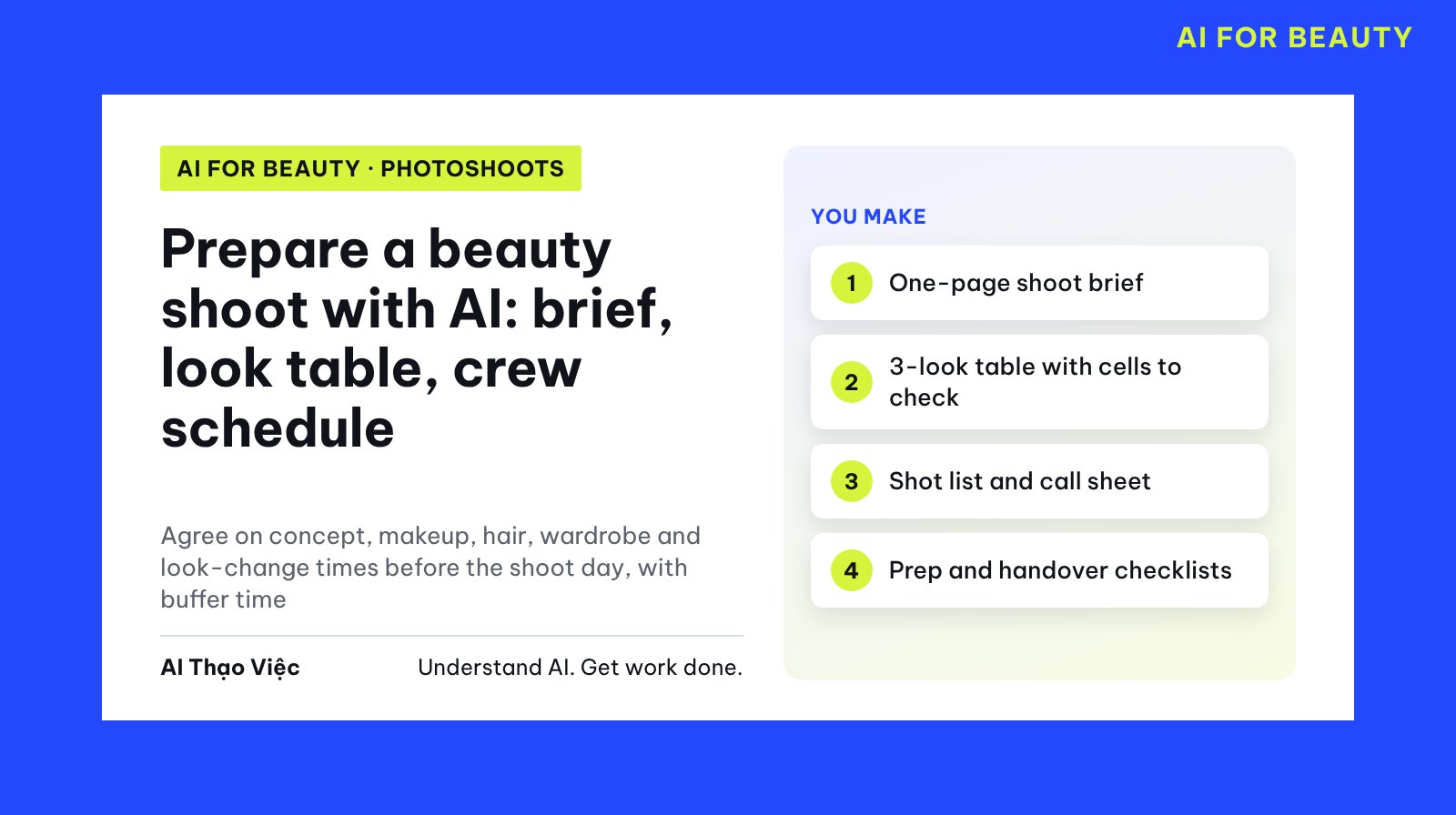
A small beauty shoot usually runs late because of things nobody says out loud: the hair for a later look needs more time than the schedule allows, an item has nobody assigned to bring it, or the makeup artist has to leave before the shoot is done. This article shows the crew how to use a text AI assistant (ChatGPT, Claude, Gemini) to pull everything into four documents: the shoot brief, the look table, the shot list and the call sheet, plus a handover checklist. Then use AI to find conflicts so the crew can decide for themselves.
This is a preparation method, not a promise of better photos. AI does not know your skills, does not know the real studio and cannot replace a crew meeting. The example in this article is simulated; Tổ Thạo Việc (the AI Thạo Việc editorial team) has not used this set of documents for a real shoot.
A few terms used here
- Prompt: the text you type to the AI; the copyable "Prompt" blocks.
- Brief (the assignment): one page saying what the photos are for and what must be kept. Concept (the main idea): the overall spirit of the shoot.
- Look: a combination of makeup, hair, wardrobe, props and set.
- Moodboard (reference board): images or descriptions that suggest color and lighting; for direction only, not photos already taken.
- Shot list: every photo you need, each with a code.
- Call sheet (crew schedule) and call time (arrival time): who arrives when, does what, and where.
- Buffer time: a gap left on purpose for delays or reshoots, not a break.
Prepare sources and remove private details
Gather all five things: the purpose of the shoot, reference descriptions, the must-keep requirements, the wardrobe and props you have (who brings them, which ones must be borrowed), and each person's arrival time.
Things not to paste into AI: phone numbers, home addresses, contracts, fees, account numbers, and photos of other people who have not agreed. Write reference images as text, for example "R1: face close-up, white backdrop, soft light from the left". Images saved from the internet whose author is unknown are for internal use only; do not send them to clients or post them. The article personal image usage log shows how to record the permitted scope of each image.
Do not put the model's measurements, weight, skin condition or comments on appearance into AI. The simulated data set below deliberately has five gaps or conflicts to test AI.
SHOOT (SIMULATED)
Purpose: beauty photos for a new lipstick line from the fictional cosmetics brand Hoa Mộc, used on the brand's sales page and social media. Plus 3 photos for the model's portfolio if the brand agrees.
Must keep: each look has at least one lip close-up with the lipstick color clearly visible; do not edit the lipstick to a color different from the real one; the logo on the lipstick case faces straight to camera.
Crew:
- Lan Chi, model: on set from 07:45.
- Minh Thư, makeup: on set from 07:45, must leave at 13:00.
- Bảo Ngọc, stylist and hair: on set from 07:30.
- Hải Đăng, photographer: on set from 08:00.
- Quốc Huy, coordinator: on set from 07:30.
Studio: rented 07:30 to 14:00, has a white backdrop, a beige backdrop, a black backdrop, one wooden chair.
Look 1 Natural Glow: light base, peach blush, earthy pink lipstick. Big loose waves, hair down. White silk shirt. Prop: Hoa Mộc sample lipstick case. White backdrop. Reference R1: a photo the crew took last time, face close-up, soft light from the left.
Look 2 Classic Red: black eyeliner, matte red lipstick. Neat high bun. Red velvet dress. Prop: wooden chair. Beige backdrop. Reference R2: photo sent by the brand, half body, seated on a chair.
Look 3 Dark Metallic: metallic brown eyes, nude lipstick. Low ponytail. Black jacket. Prop: mirror tray. Black backdrop. Reference R3: image saved from the internet, author unknown.
Stylist already has: white silk shirt, black jacket, black skirt.
To borrow: red velvet dress (asked a familiar shop, no reply yet).
Mirror tray: nobody listed to bring it.
Coordinator's draft schedule:
08:00 start makeup for look 1
09:00 to 10:00 shoot look 1
10:00 to 10:10 change to look 2
10:10 to 11:30 shoot look 2
11:30 to 12:00 change to look 3
12:00 to 13:30 shoot look 3
13:30 to 14:00 clean up
The five built-in traps: 10 minutes to go from loose waves to a high bun plus a lipstick change and a dress change; the velvet dress is not confirmed; the mirror tray has nobody to bring it; look 3 is shot until 13:30 while the makeup artist leaves at 13:00; image R3 has an unknown author. The draft schedule also has no buffer minutes at all.
Step 1. Clarify the purpose before debating looks
Sales photos need product close-ups and accurate lipstick color; portfolio photos need to show skill. With two purposes, you must say which one takes priority when time runs short. Open a new chat, paste the simulated data, then paste:
You are a photoshoot coordination assistant. Only use the data I just pasted.
Write a shoot brief of at most one page, including:
1. Main purpose and secondary purpose; which purpose takes priority when time runs short (if the data does not say, write Need to ask).
2. Where the photos will be used.
3. The must-keep requirements, copied word for word.
4. A one-sentence concept, based on the three existing looks.
5. The list of references R1, R2, R3, each with its source and whether it is for internal use only or may be sent outside.
6. Missing questions the crew or the brand needs to answer.
Do not describe the model's appearance, body or face.
Do not add looks, products or brand requirements on your own.
Wherever there is no data, write exactly: no data yet.
Editorial answer (written by the editors, not yet run on a real tool): the brief passes when it states the main purpose is sales photos for the Hoa Mộc lipstick line and the secondary purpose is 3 portfolio photos "if the brand agrees"; the priority when time runs short says Need to ask. R1 can be used, for R2 ask the brand whether it may be shared with the crew, R3 is internal only or replaced with a text description. The missing questions include at least: does the brand agree to the photos being used in a portfolio, who brings the mirror tray, has the velvet dress been secured, how many photos must be delivered and by when.
Step 2. Record every element of each look
The look table is where makeup, hair and the stylist all look at the same place. Every cell must answer "who handles it, do we have it". Add two columns that draft schedules often forget: tasks needed to change into this look and person in charge.
From the shoot data, build a look table. One column per look, with these rows:
Makeup; Hair; Wardrobe; Props; Set; Reference;
Tasks needed to change from the previous look to this look;
Who is in charge of each task; Items we have or are still missing.
Rules:
- If the data lists nobody to bring an item, write: nobody assigned.
- If an item is being borrowed but not confirmed, write: not confirmed.
- Do not assign tasks to anyone when the data does not say so.
- Do not suggest changing the hairstyle, lipstick color or wardrobe.
After the table, list the Nobody assigned and Not confirmed cells separately.
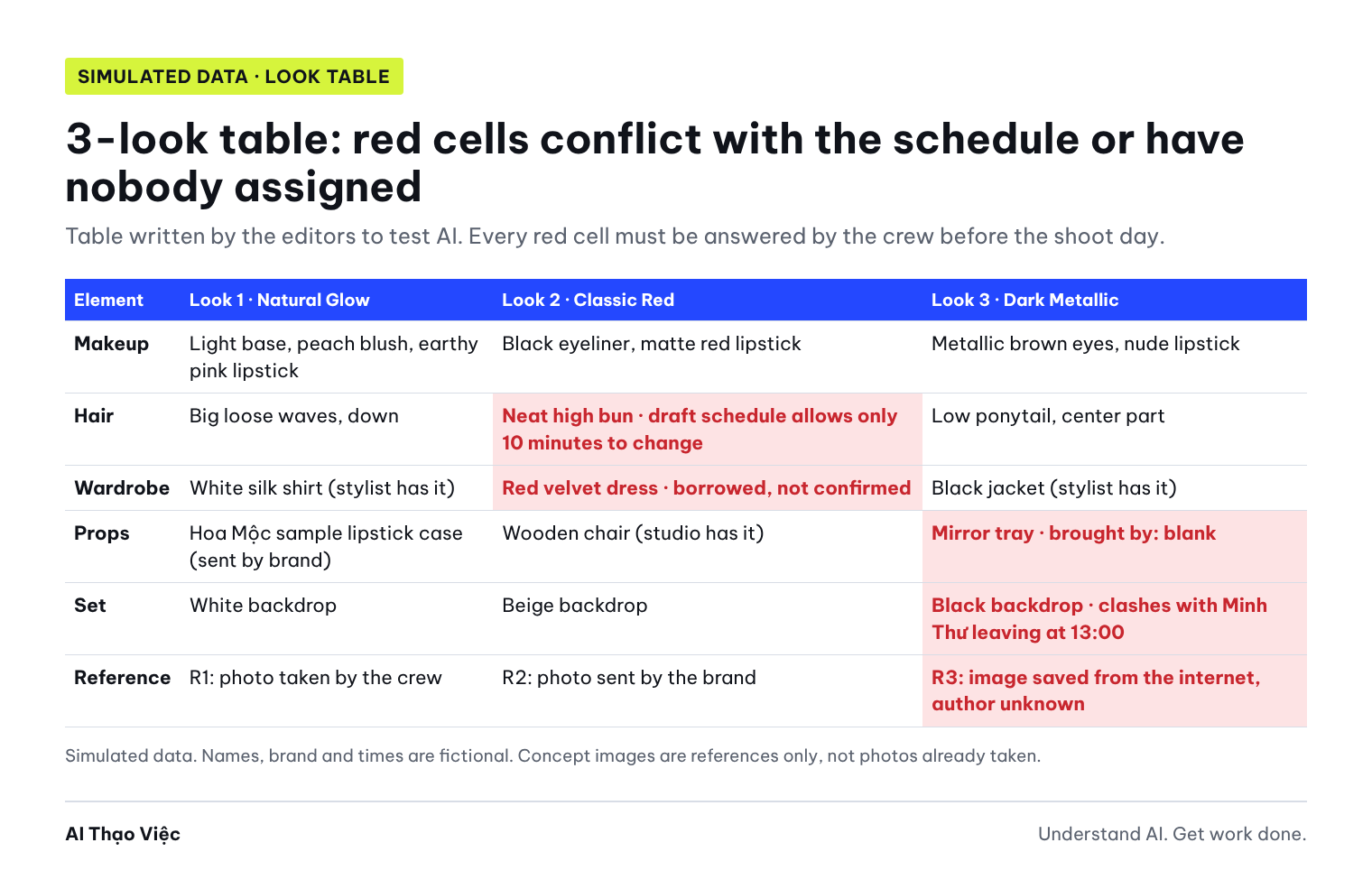
The expected result looks like the image above. The "tasks to change look" row for look 2 must include all four tasks: undo or flatten the waves to make a high bun, remove the earthy pink lipstick, apply eyeliner and red lipstick, change the dress. Seeing these four tasks side by side, the 10 minutes in the draft schedule is clearly not enough, even before anyone times it.
Step 3. Have AI build the shot list, call sheet and checklist
Once the look table is clear, AI drafts a schedule. You provide the estimated duration of each task; AI does not guess the crew's skill level. In the example, the editors assume makeup and hair for the first look take 55 minutes, changing to look 2 takes 45 minutes, changing to look 3 takes 40 minutes, and each look is shot in 50 minutes. These numbers are for illustration only; the crew sets their own based on experience.
Use the look table you just built and these durations (estimated by the crew):
makeup and hair for look 1: 55 minutes; change to look 2: 45 minutes;
change to look 3: 40 minutes; shooting each look: 50 minutes; meal break: 15 minutes.
Return three parts:
A. Shot list: 3 photos per look, codes S1 to S9, with shot size (lip close-up, face close-up, half body), props needed, purpose (sales or portfolio). Each look must have at least one lip close-up.
B. Call sheet by time slot within the studio window 07:30 to 14:00: time, task, who is present. Respect each person's arrival and leaving times. Leave at least 30 consecutive minutes of buffer before clean-up. If it does not fit, say exactly how many minutes are missing; do not shorten durations on your own.
C. A prep checklist before the shoot day and a handover checklist at the end of the session, each item with a person in charge or marked nobody assigned.
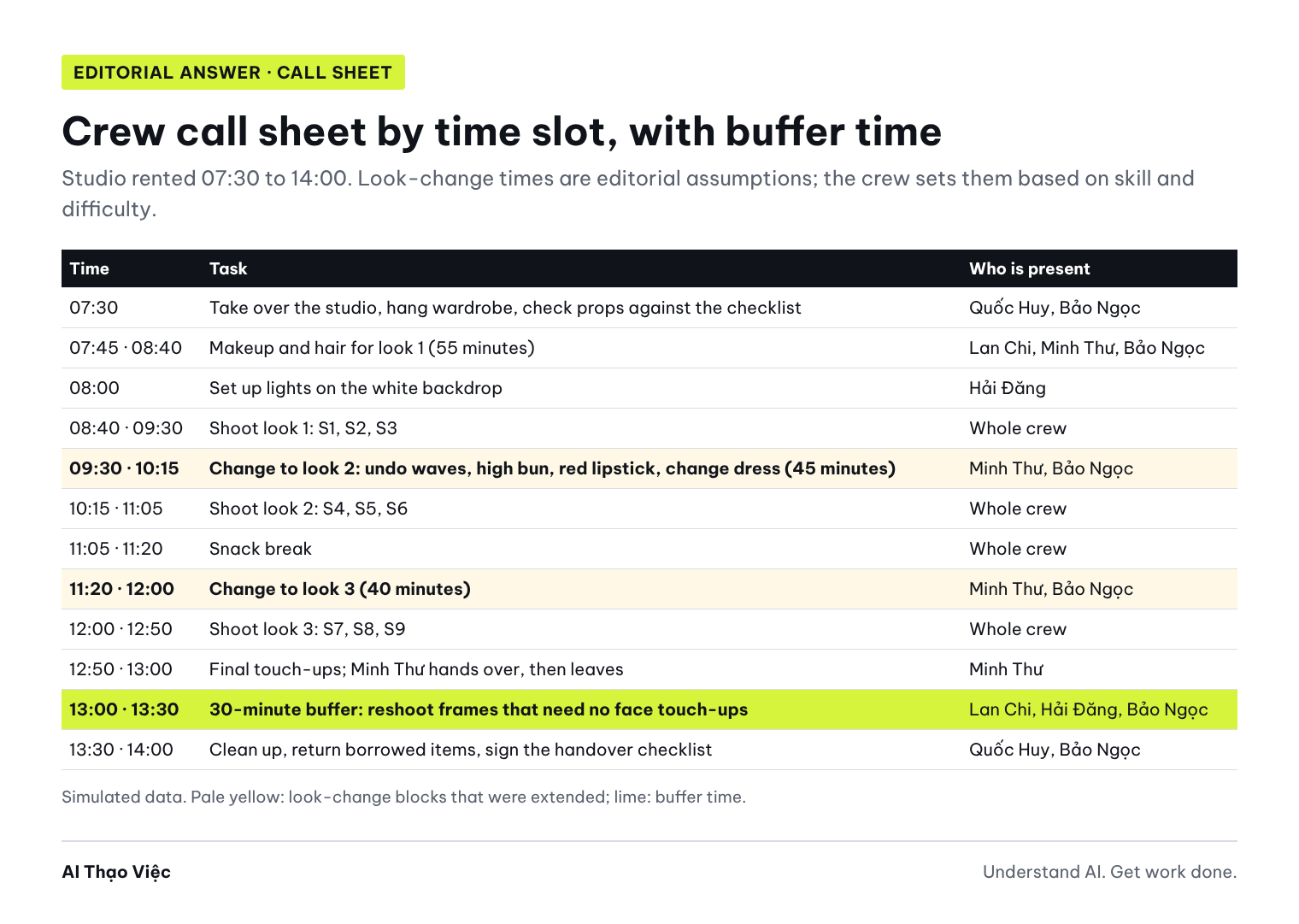
The Editorial answer for the call sheet is the image above. Two points to notice: look 3 finishes at 12:50 so Minh Thư can do final touch-ups and leave exactly at 13:00; the buffer block from 13:00 to 13:30 is only for frames that need no face touch-ups. Sample shot list:
| Code | Look | Shot size | Props | Purpose |
|---|---|---|---|---|
| S1 | 1 | Lip close-up, earthy pink lipstick | None | Sales |
| S2 | 1 | Face close-up, hand holding the lipstick case, logo straight | Sample lipstick case | Sales |
| S3 | 1 | Half body, white backdrop | None | Portfolio (if the brand agrees) |
| S4 | 2 | Lip close-up, matte red lipstick | None | Sales |
| S5 | 2 | Half body, seated on the wooden chair | Wooden chair | Sales |
| S6 | 2 | Face close-up in profile, bun visible | None | Portfolio (if the brand agrees) |
| S7 | 3 | Lip close-up, nude lipstick | None | Sales |
| S8 | 3 | Face close-up, reflection in the mirror tray | Mirror tray | Sales |
| S9 | 3 | Half body, black jacket | None | Portfolio (if the brand agrees) |
Minimum handover checklist: who keeps the original files, have they been backed up; S1 to S9 shot or reshot; borrowed items returned, with the recipient's signature; makeup products used for each look; deadline for delivering the selected photos.
Step 4. The crew confirms each line
The version AI writes is a draft. Send each person their part and ask them to reply "agree" or "change to...". The makeup artist confirms look-change times; the stylist confirms wardrobe and hair; the model confirms arrival time and garment sizes; the coordinator confirms the studio and borrowed items.
From the look table, shot list and call sheet you built, write for each crew member
a short, polite message that includes:
- Arrival time and the time they may leave.
- Their tasks for each look.
- Items they need to bring.
- Questions they need to answer, numbered.
At the end of each message: ask them to reply Agree or Change to, before 18:00 the day before the shoot.
Do not add fees, addresses or any information I have not provided.
Save the replies. If you share a spreadsheet, the Google Drive help page lists three roles: viewer, commenter, editor; the coordinator can be editor and crew members commenters. Share the schedule through Google Calendar at the "see all event details" level so everyone sees the times without editing them by mistake.
Step 5. Check look changes and buffer time
This is the conflict-finding step. Paste the look table and the coordinator's original draft schedule again (not the schedule AI just fixed), then ask AI to compare line by line.
Compare the look table with the draft schedule below. List every conflict in a table:
Code | Look | Description of the conflict | Which line in the look table | Which line in the schedule | Who needs to decide.
Check at least these types:
- Look-change time compared with the number of tasks (hair, makeup, wardrobe).
- Items with nobody to bring them or not confirmed.
- People who must be present but have already left or not yet arrived.
- References with unclear usage rights.
- Whether the schedule has any buffer time.
Do not fix the schedule yourself, do not choose an option, do not assign people.
Only list and ask.
Editorial answer: AI passes when it finds all six items: (1) 10 minutes to change to look 2 is not enough to undo the waves, make a high bun, change lipstick and change the dress; (2) the red velvet dress is not confirmed, and look 2 has no backup plan; (3) the mirror tray has nobody to bring it, and photo S8 depends on it; (4) look 3 is shot until 13:30 but Minh Thư leaves at 13:00; (5) R3 has an unknown author; (6) the schedule has no buffer minutes at all. Items (2) and (3) must say "coordinator decides"; item (1) must say "Minh Thư and Bảo Ngọc re-estimate the time".
Spot wrong output
Compare what AI returns with the six items above. Common errors:
- Decides for the crew: AI writes "Bảo Ngọc brings the mirror tray" or "replace the velvet dress with the black skirt". The data does not say this; that is a decision for the coordinator and the stylist.
- Keeps a wrong number to fit the schedule: AI keeps the 10-minute look change and adds "quick change" or "prepare in parallel". A note does not make a bun any faster.
- Cuts shooting time to squeeze in a buffer: AI cuts each look to 30 minutes without saying so. Prompt 3 already said to state exactly how many minutes are missing.
- Comments on appearance: AI writes "a slim face suits red lipstick" or suggests the model "keep in shape". Remove it immediately; the brief does not assess bodies.
- Treats reference images as photos you already have: AI suggests posting moodboard images as "behind the scenes" or putting AI-generated images in the portfolio. Reference images, including those made by image generation tools, are not proof that the shoot took place.
Your last version has places where you decided for the crew. Fix them:
1. Remove every assignment of people that the data does not state; replace it with: nobody assigned.
2. Remove the wardrobe substitution; write: waiting for the coordinator and stylist to decide.
3. Keep the durations I gave. If the schedule does not fit, write the number of minutes missing.
4. Delete every sentence describing the model's appearance or body.
5. State clearly that reference images are for direction only, not to be used as product photos or behind-the-scenes photos.
Return the corrected table and list the lines you changed.
Use it with your own data
- The coordinator replaces the simulated data with the real shoot; removes phone numbers, prices and contracts; describes references in text with their source.
- The makeup artist and stylist write their own look-change durations; do not use the numbers in this article.
- Run prompts 1 to 5, then hold a short meeting to answer each conflict. Anyone who has not replied to the confirmation message counts as not confirmed.
- Approvers: the coordinator approves the schedule; the client who booked the shoot approves the brief and shot list; the model approves their own part. Check the brief against the brand's written requirements; see the article handling brand collaboration invites.
A suggestion for workshops or classes: form groups of 3 (one plays the makeup artist, one the stylist, one the coordinator). Each group builds the brief and table for one look, using prompts 2 and 3. After 20 minutes, swap with the next group to cross-check using prompt 5 and the "Check before you use it" list. The checking group notes the conflicts found; the drafting group answers each item before considering the brief done.
Check before you use it
- The brief states the main purpose and what takes priority when time runs short.
- The must-keep requirements are copied word for word, not paraphrased.
- Every garment and prop has the name of the person bringing it or clearly says nobody assigned.
- Look-change times are estimated by the professionals, not guessed by AI.
- Nobody is scheduled before their arrival time or after their leaving time.
- The schedule has at least one consecutive buffer block, stating what it is for.
- Every photo in the shot list has a code, shot size and purpose; every look has its required shot.
- References with unclear rights are internal only or replaced with text descriptions.
- No sentence comments on the model's appearance, body or skin.
- Every crew member has replied Agree or Change to.
When things go wrong
- The schedule does not fit the studio window: go back to the priority purpose. Drop portfolio shots before required shots, or drop a look, instead of squeezing look-change time.
- Borrowed items do not arrive in time: the coordinator and stylist choose a substitute from what is available, update the look table, and resend the confirmation to the model and the client who booked the shoot.
- A crew member changes times at the last minute: rerun prompt 5 with the new times; see which look is affected and move it into the buffer block if possible.
- AI keeps suggesting a new concept: add the sentence "The concept and looks are final; only build the schedule and find conflicts" at the start of the prompt.
- The shoot day runs faster than expected: still keep the buffer block for reshooting missing frames and checking the original files; do not use it all on shots outside the shot list without asking the client who booked the shoot.
Limits and sources
The crew, brand, times and durations are simulated; look-change times are editorial assumptions, not industry standards. The answers were written by the editors, have not been run on a real AI tool and have not been used for a real shoot. This article does not cover fees, contracts or image rights; ask a qualified professional before signing or publishing.
- Google Calendar Help, Share your calendar: permission levels from seeing only free/busy to making changes and managing sharing. Checked on 31 Oct 2026.
- Google Drive Help, Share files from Google Drive: viewer, commenter and editor roles when sharing a spreadsheet. Checked on 31 Oct 2026.
Read next: from portfolio to case study (in Vietnamese) to present the photos after the shoot; a makeup artist's request form; asking AI to critique a plan (in Vietnamese); and if the shoot includes filming a routine, turning a makeup or hair routine into a shooting script.