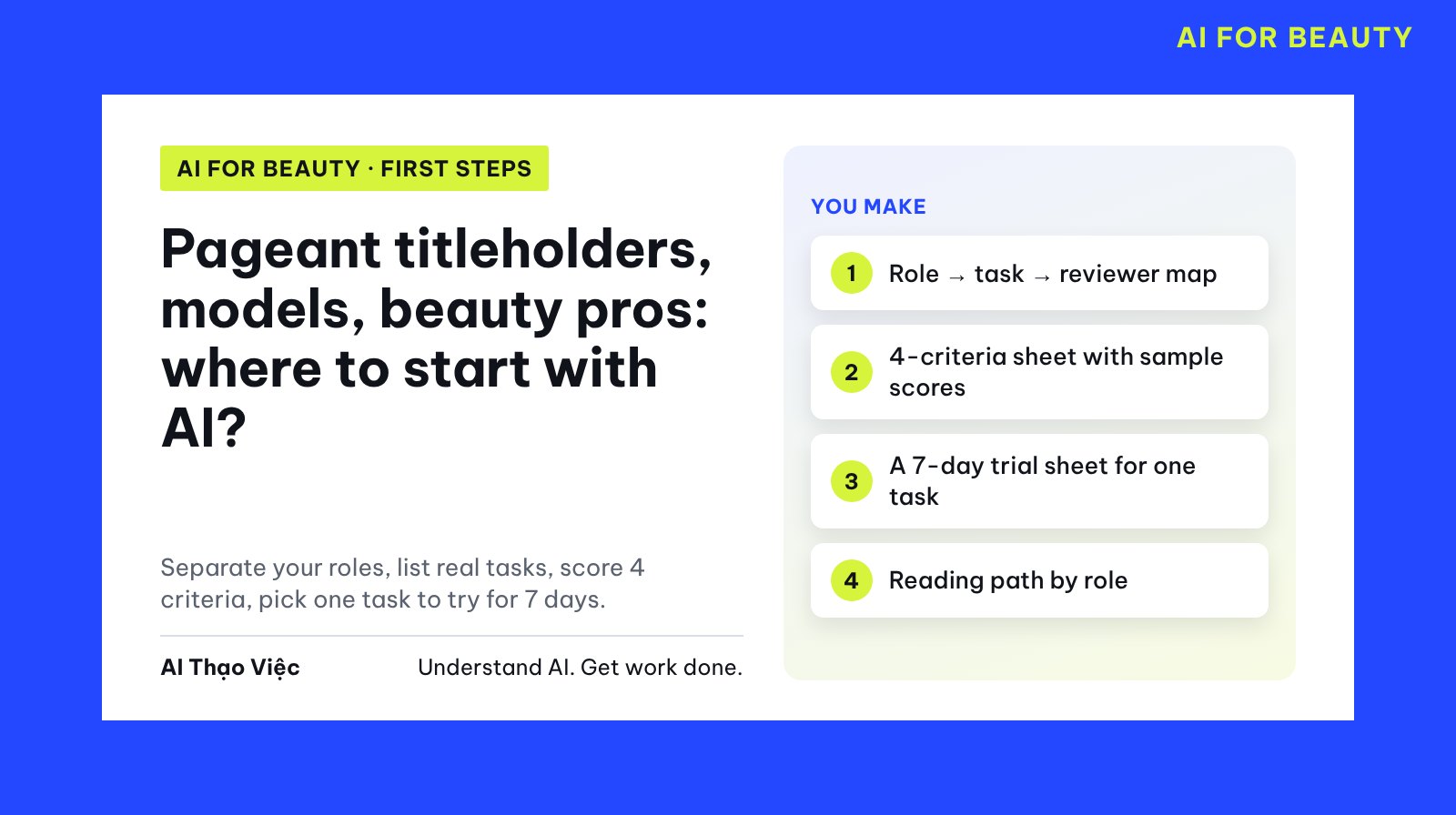
This article helps you choose one first task to use AI for, matched to the role you actually do: a model taking bookings, a makeup artist, a cosmetics content creator, a trainer or a shop owner. You get a task map, a four-criteria scoring sheet with sample scores and a 7-day trial sheet. This is a method for choosing a task, not a promise of more clients, more views or more income.
The needs described here are editorial hypotheses: Tổ Thạo Việc (the AI Thạo Việc editorial team) wrote them from common working practices and has not surveyed real professionals. Treat the map as a suggestion, then confirm your own real tasks from the last 2 weeks. The way of choosing a task reuses the method in Choosing your first task to use AI for at work (in Vietnamese); this article does not repeat how to open an AI account.
A few terms used here
- Prompt: the text you type to give AI a task. The "Prompt" blocks in this article can be copied as they are.
- Booking: a shoot, event or show that a model agrees to work.
- Brief: the document the client sends, with the goal, time, location, wardrobe and makeup requirements.
- Look: the overall makeup, hair and wardrobe for one session.
- Rubric (scoring sheet): a table of criteria with a point scale, used to score consistently.
- Reviewer: the person responsible for checking AI output before it is used. For freelancers, this is usually you.
A role is not a title
"Người đẹp" (pageant titleholder, beauty queen) is what one community calls its members, not a profession. Two people who are both pageant winners can do very different work: one takes photo shoot bookings, one makes makeup tutorial videos, one teaches skills classes. AI can only help when you state the task, not the title.
This article follows a five-box chain: role → task → input → output → reviewer. If one box is missing, you cannot hand the task to AI yet. "Doing beauty content" is not a task; "from 8 existing ideas, plan a 14-day posting schedule" is a task.
Prepare your sources and remove private details
Before you paste anything into an AI tool, remove: clients' phone numbers, addresses and real names; real contracts and quotes; photos of clients or other people who have not agreed; private messages with personal information. Replace them with codes (K01, K02) or general descriptions.
Why: according to the official help pages, ChatGPT temporary chats are not used for training but are still kept for up to 30 days; Claude incognito chats are not saved to your history, and by default are still kept for 30 days on the provider's side; Gemini advises you not to enter confidential information you would not want a reviewer to see, and activity that reviewers have seen can be kept for up to three years. No-history modes reduce risk, but they do not replace removing private details before you paste.
The three profiles below are entirely simulated. They deliberately include gaps and one request that should not be done, so you can test whether the AI notices.
PROFILE 1 (SIMULATED) · Lan Chi, freelance photo model
Goal: reply to booking inquiries faster without missing any of her booking conditions.
Recurring tasks: about 10 shoot inquiries per week; reads a shoot brief 2 to 3 times per month; occasionally receives a booking contract.
Tools: phone, Google Calendar, messaging app.
Data allowed: Lan Chi's own open dates; a booking conditions sheet Lan Chi wrote herself (working hours, area, types of work she does not accept).
Data not to paste: booking contracts (with confidentiality clauses), the client's name and phone number.
Time for the trial: 20 minutes per day.
Extra wish: "have AI choose a look that suits my personality".

PROFILE 2 (SIMULATED) · Minh Thư, freelance makeup artist
Goal: fewer booking mix-ups, less back-and-forth with clients.
Recurring tasks: about 6 bookings per week; each booking needs several messages to settle the time, place and number of people; posts work photos 3 times per week.
Tools: phone, notebook, personal page.
Data allowed: client request notes after removing names and phone numbers; the published price list.
Client photos: no confirmation yet that clients agree to posting.
List of past clients with phone numbers: yes, clients have not been asked about using it for other purposes.
Time for the trial: 15 minutes each evening.

PROFILE 3 (SIMULATED) · Bảo Ngọc, cosmetics content creator
Goal: post consistently, run out of ideas less often.
Recurring tasks: 4 videos per week; replies to comments asking about products; keeps a trial diary of products she buys herself.
Tools: TikTok, CapCut, Google Sheets.
Data allowed: a list of 8 existing video ideas; Bảo Ngọc's own trial diary; busy shoot days on the 7th, 8th and 12th.
Time for the trial: (not filled in)
Three planted traps: Lan Chi wants AI to "choose a look by personality" (should not be done); Minh Thư has a past-client list she is not yet allowed to use; Bảo Ngọc has not filled in her trial time.
Step 1. List your real tasks by role
Open a new chat, paste the prompt below, then paste the three profiles. With your own profile, paste only one profile.
Help me build a task map for people working in the beauty industry.
Use only the profiles I paste below. Do not add tasks the profiles do not mention.
For each profile, make a 6-column table:
Role | Recurring task | Input | Output AI produces | Reviewer | How to check.
Every task must have an input taken from the "Data allowed" section.
If a task needs data that is not allowed, write "not enough data permission".
Do not suggest tasks that rate faces, bodies or beauty,
or guess personality from appearance; if a profile has such a wish,
state clearly that it is not included in the map and give a short reason.
If a profile is missing a field, write "not yet provided" and ask me.
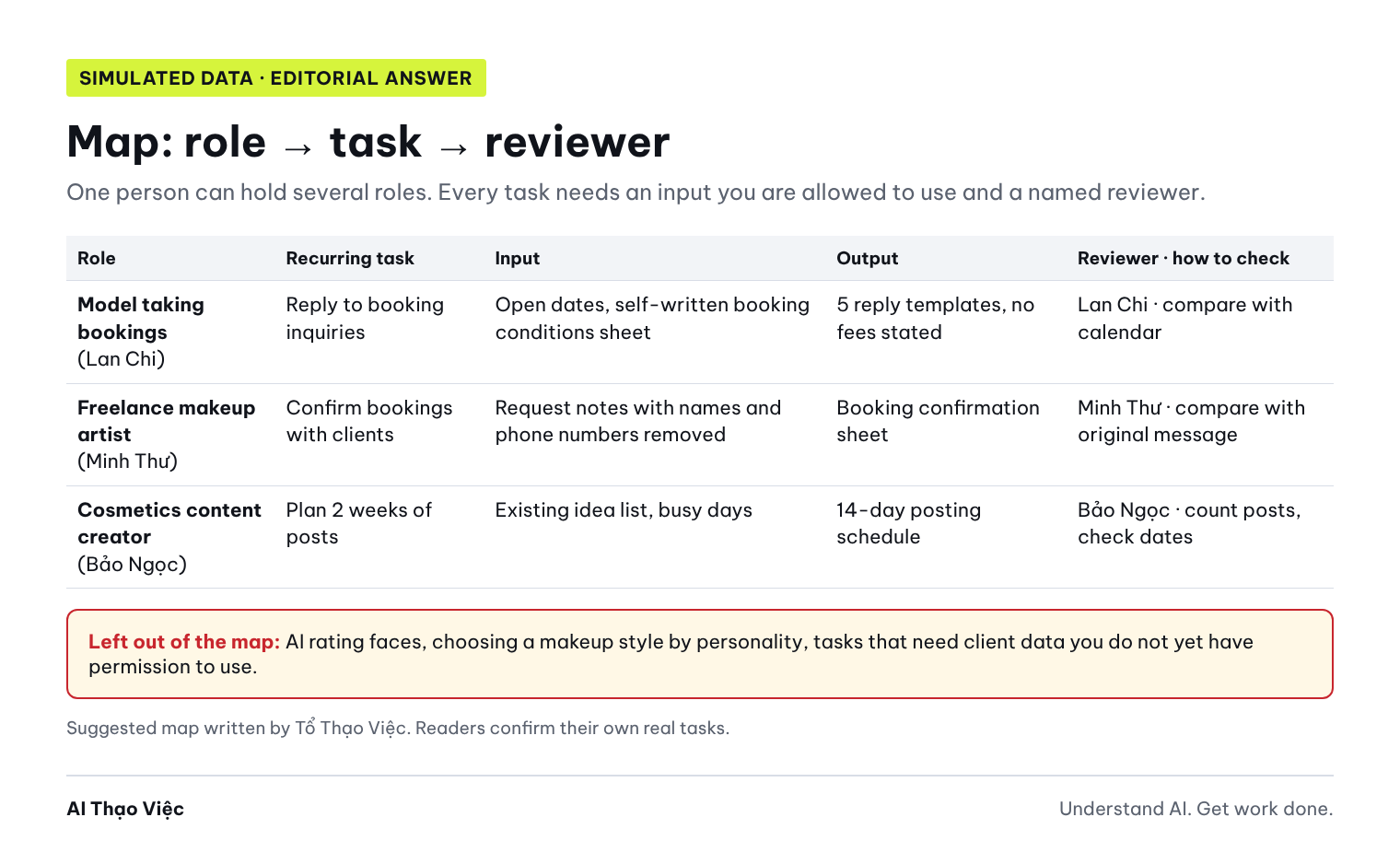
Editorial answer (written by the editors, not yet run on a real tool): each profile has 2 to 3 tasks; Lan Chi has "reply to booking inquiries", "summarize the brief into a prep sheet" and "review booking contract" marked "not enough data permission"; the wish to choose a look by personality is marked "not included in the map". Minh Thư has "booking confirmation sheet" and "work photo captions" with the note "waiting for client consent to post photos". Bảo Ngọc has "2-week posting schedule" and "review outline from diary"; the AI must ask again about her trial time.
Step 2. Score tasks on four criteria
Your first task should depend little on other people and be easy to check. Score each task on four criteria, 0, 1 or 2 points each:
- Recurs often: 2 if several times a week; 1 if a few times a month; 0 if rare.
- Data is available and allowed: 2 if it is your own data; 1 if usable after removing private details or still waiting for consent; 0 if you have no permission.
- Errors are easy to spot: 2 if you can check it in a few minutes (dates, times, number of posts); 1 if you must read each sentence carefully; 0 if only an expert would notice.
- No professional or legal decision needed: 2 if it does not touch fees, contracts, product effects or the client's skin; 1 if it partly does and you can decide yourself; 0 if it needs an expert.
Use the task map you just made. Score each task on 4 criteria,
0, 1 or 2 points each:
1. Recurs often.
2. Data is available and allowed.
3. Errors are easy to spot.
4. No professional or legal decision needed.
Write a one-sentence reason for each score, based strictly on the profile.
Add up to a maximum of 8. For each profile, choose the one highest-scoring task
that has a named reviewer. If two tasks tie, choose the one
that does not wait for someone else's consent, and explain why.
Do not score tasks marked "not included in the map".
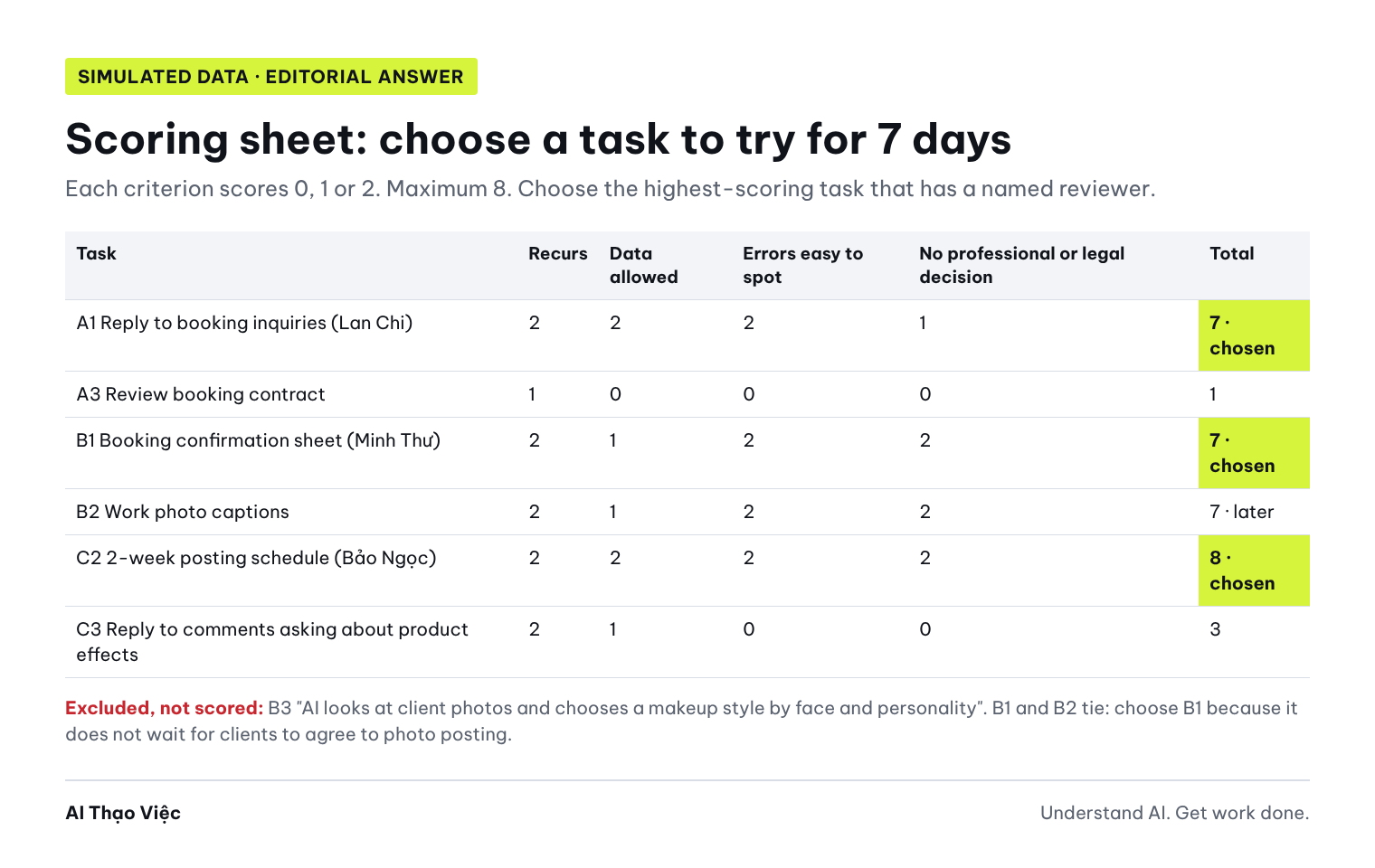
Editorial answer:
| Task | Recurs | Data | Errors easy to spot | No professional or legal decision | Total |
|---|---|---|---|---|---|
| A1 Reply to booking inquiries (Lan Chi) | 2 | 2 | 2 | 1 (clients often ask about fees and image rights: Lan Chi answers those herself) | 7, chosen |
| A2 Summarize brief into a prep sheet | 1 | 1 (a brief may contain confidential information) | 2 | 2 | 6 |
| A3 Review booking contract | 1 | 0 | 0 | 0 | 1 |
| B1 Booking confirmation sheet (Minh Thư) | 2 | 1 (remove names and phone numbers first) | 2 | 2 | 7, chosen |
| B2 Work photo captions | 2 | 1 (waiting for client consent to post photos) | 2 | 2 | 7, later |
| C1 Review outline from diary | 2 | 2 | 1 | 1 (touches product effects) | 6 |
| C2 2-week posting schedule (Bảo Ngọc) | 2 | 2 | 2 | 2 | 8, chosen |
| C3 Reply to comments asking about product effects | 2 | 1 | 0 | 0 | 3 |
B1 and B2 tie at 7 points. Choose B1 because it does not wait for clients to agree to photo posting. A low-scoring task is not a bad task; it is just not the right first task. Reviewing contracts and answering questions about cosmetic effects need an expert and official sources.
Step 3. Make one small template
Take exactly the task you chose and make one template you can use today. For example, for Lan Chi, also paste the simulated conditions sheet below.
BOOKING CONDITIONS (SIMULATED)
Open dates in November: Tuesday and Thursday all day; Saturday morning.
Working hours: 7:00 to 18:00. Outside these hours, ask first.
Area: Ho Chi Minh City. Other provinces: the client must arrange travel.
Not accepted: lingerie shoots, dietary supplement ads.
Fee: not stated in the first reply; discussed privately after receiving the brief.
Image rights: not answered in the first message; wait for the brief and contract.
Based on the booking conditions sheet above, draft 5 reply templates
for 5 situations: available; not available on the requested date, suggest open dates;
outside the service area; type of work not accepted; client asks about the fee right away.
Each template at most 60 words, polite, short, written in the first person.
Use only open dates from the sheet. Do not state any fee amount,
do not promise anything about image rights. For fee questions,
ask for the brief first and offer to discuss privately.
Finally, list the information the sheet does not have that clients might ask about.
Expected output (Editorial answer): five short templates ready to use. The "not available" template suggests only Tuesday, Thursday and Saturday morning. The "fee question" template says, in effect, "I'll send my fee after I see the brief." The list of missing information includes at least: minimum session length, how quickly you reply to messages, whether you accept outdoor shoots.
For Minh Thư, the small template is a booking confirmation sheet based on the published price list; see how to make a request form in Makeup artists: a standard price list and request form. For Bảo Ngọc, the small template is a 14-row table: date, video idea, filming status, avoiding the 7th, 8th and 12th.
Step 4. Keep a 7-day trial sheet and pick the next task
Make a 7-day trial sheet for the task I chose: [task name].
The sheet includes:
1. Baseline: how many times a week I do this task now, and how many minutes it takes.
2. A 7-row table: day | times I used the AI template | times I had to edit | errors found | minutes saved (I fill this in).
3. The reviewer and how they check each use.
4. Three end-of-week questions: keep this task or not; where to fix the template;
   which task from the map to try next.
Do not fill in numbers for me. Leave any field I have not provided blank.
Time I give each day: [minutes]. If I have not filled it in, ask me.
Editorial answer: the sheet has all four parts, with the number fields blank. For Bảo Ngọc, the AI must ask about her trial time because the profile says "not filled in". The sheet stops at 7 days: enough to know whether the template works, not enough to draw conclusions about views or revenue.
Spot bad output
Three common errors, and how to fix them:
- Putting a task that should not be done into the map: the AI writes "Lan Chi can use AI to rate her face and choose a makeup style that suits her personality". Appearance does not reveal personality; rating looks is not what this article teaches. Check: search the table for the words "face", "personality", "rate", "assess appearance".
- Using data without permission: the AI suggests Minh Thư "paste the past-client list so AI can write bulk follow-up messages". The profile says clients have not been asked about other uses of this list. Check: every input must be in the "Data allowed" section.
- Filling in gaps on its own: the AI writes "Bảo Ngọc spends 30 minutes a day" while the profile leaves it blank. Check: compare every number with the profile.
Fix the task map on three points:
1. Remove every task that rates faces, assesses appearance or chooses a
   makeup style by personality. Mark it "not included in the map".
2. Any task that needs the past-client list or data that is not allowed,
   move to "not enough data permission" and do not score it.
3. Remove the time figure you added for Bảo Ngọc; write "not yet provided" and ask me.
Point out exactly which rows you changed. Do not add new tasks.
Also watch for: the AI giving all three profiles the same need, or giving 2 points for "errors easy to spot" to answering questions about cosmetic effects.
Reading path by role
- Pageant titleholders, models: a media kit with accurate numbers; accepting a collaboration offer: separating tasks and questions; preparing a photo shoot; a personal image usage log; practice poise with scenario cards (in Vietnamese) and observation sheets (in Vietnamese).
- Beauty creators: a 4-week content calendar; from a cosmetics diary to a review; preparing a livestream (in Vietnamese); finding stories in real material (in Vietnamese).
- Beauty professionals (makeup, hair, nails, lashes): price list and request form; per-session quotes; turning a routine into a shooting script; from portfolio to case study (in Vietnamese).
- Trainers: writing practice sheets; 7-day practice sheets after a class (in Vietnamese).
- Beauty shop owners: hair salons choosing a first task; spas and massage shops (about running a business, different from this article).
- Community projects: plan, task owners, evidence.
Use it with your own data
- Open your calendar and messages from the last 2 weeks. Note tasks that recur 2 or more times.
- Write your profile using the same six lines as the sample: goal, recurring tasks, tools, data allowed, data not to paste, trial time.
- Remove names, phone numbers, client photos and contracts. Use a temporary or incognito chat mode if the tool has one.
- Run Prompts 1 and 2. Rescore at least two tasks by hand; where you differ from the AI, trust your score and note why.
- Choose one task, make a small template, run the 7-day sheet. Reviewer: you; for shop owners, add the shift manager. For anything touching fees, contracts or product effects, ask an expert before sending it to a client.
Tip for workshops or classes: send the six-line sheet before the session so learners fill in their real tasks; during the session, each learner picks one practice track (model, beauty professional, creator) and scores tasks on the four-criteria sheet; at the end, everyone leaves with a 7-day trial sheet.
Check before you use it
- Every task in the map has all five boxes: role, task, input, output, reviewer.
- Every input is in the data-allowed section.
- Names, phone numbers, client photos and contracts were removed before pasting.
- No task rates faces, assesses bodies or guesses personality.
- Each criterion score has a reason taken from the profile, not a guess.
- The chosen task does not require decisions about fees, contracts or product effects.
- Missing fields say "not yet provided" and were not filled in by the AI.
- Reply templates contain no fee amounts and no promises about image rights.
- The 7-day sheet has a baseline and number fields for you to fill in.
Troubleshooting
- The AI suggests too many tasks: ask it to keep only tasks that recur at least 2 times a week, at most 3 tasks per role.
- You have several roles at once: map each role, but choose only one task across all of them to try this week.
- Every task scores low on the data criterion: your first task should be writing your own conditions sheet, price list or idea list; that is your own data.
- The AI gives generic answers for "pageant titleholders": restate your specific role and paste your profile again; do not use a title in place of a role.
- A client asks something the template does not cover: answer it yourself, then add it to your conditions sheet; do not let the AI guess.
Limits and sources
The map, needs and scores are editorial hypotheses written by Tổ Thạo Việc with simulated data; they have not been run on a real AI tool and real professionals have not been surveyed. All people and figures are fictional. This article is not legal advice; for contracts, image rights and client data, ask a qualified expert.
Sources opened and checked on 31 Oct 2026:
- OpenAI, Data Controls FAQ: turning off use of data for training; temporary chats are deleted within 30 days.
- Anthropic, Use incognito chats: incognito chats are not used for training, do not go into history, and are kept for 30 days by default.
- Google, Gemini Apps Privacy Hub: do not enter confidential information; reviewers may see part of the data; retention periods.
Conditions for using each tool in Vietnam (supported countries, minimum age) may change; check the terms on the tool's official site before using it for work. Read next: Choosing your first task to use AI for (in Vietnamese) and the article for your role in the reading path above.